Use this file to discover all available pages before exploring further.
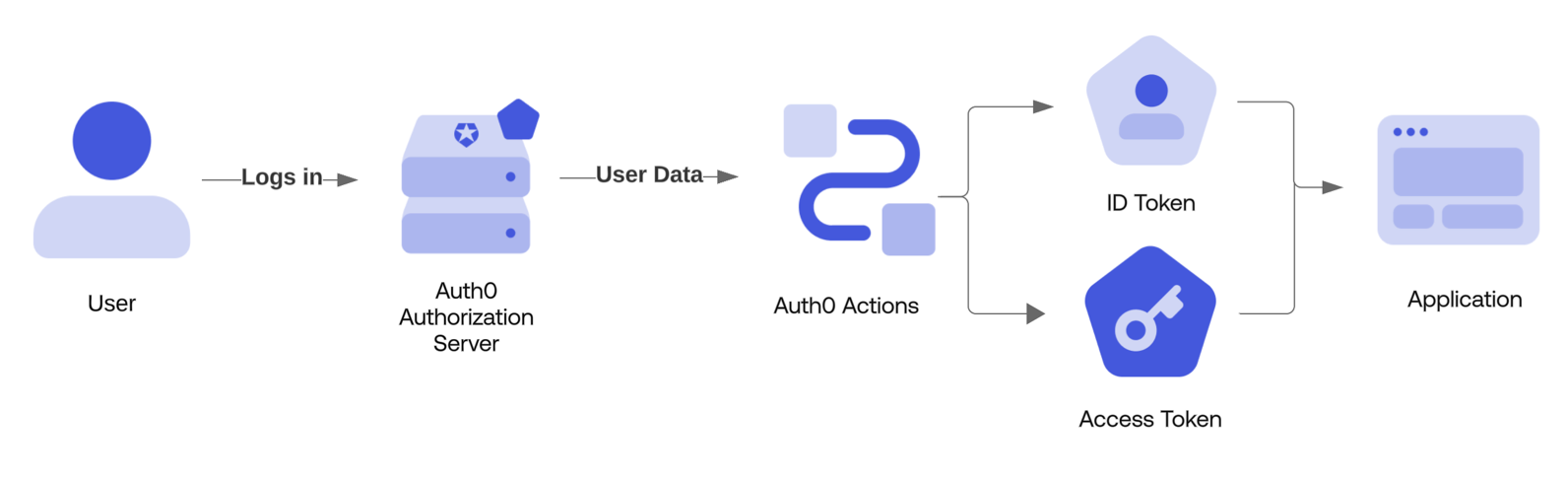
The Login trigger executes when a user successfully authenticates against an application on an Auth0 tenant. This also includes post-signup authentication.
Actions in this trigger are blocking (synchronous), which means they execute as part of a trigger’s process and prevent the rest of the Auth0 pipeline from running until the Action is complete.
A post-login Action can be used to provide custom logic used to deny access to a user who is attempting to access an application:
/** * @param {Event} event - Details about the user and the context in which they are logging in. * @param {PostLoginAPI} api - Interface whose methods can be used to change the behavior of the login. */exports.onExecutePostLogin = async (event, api) => { if (event.user.email && event.user.email.endsWith("@example.com") && event.client.name === "My SPA") { api.access.deny(`Access to ${event.client.name} is not allowed.`); }};
Allow access only on weekdays for a specific application
If you have an application that you want to make sure is only accessible during weekdays, you can create the following Action:
/** * @param {Event} event - Details about the user and the context in which they are logging in. * @param {PostLoginAPI} api - Interface whose methods can be used to change the behavior of the login. */ exports.onExecutePostLogin = async (event, api) => { if (event.client.name === "APP_NAME") { const d = new Date().getDay(); if (d === 0 || d === 6) { api.access.deny("This app is only available during the week."); } }}
Let’s say you want to deny access to all users who are calling an API. This means that you need to deny access depending on the value for your API, which you can find in the API Audience field of your API in Dashboard > Applications > APIs. To do this, you would create the following Action:
/** * @param {Event} event - Details about the user and the context in which they are logging in. * @param {PostLoginAPI} api - Interface whose methods can be used to change the behavior of the login. */ exports.onExecutePostLogin = async (event, api) => { // In Actions, an API will be referred to as a Resource Server. if (event.resource_server && event.resource_server.identifier === "http://todoapi2.api") { api.access.deny("end_users_not_allowed"); }}
To add user roles to Auth0-issued tokens, use the event.authorization object along with the api.idToken.setCustomClaim and api.accessToken.setCustomClaim methods:
/** * @param {Event} event - Details about the user and the context in which they are logging in. * @param {PostLoginAPI} api - Interface whose methods can be used to change the behavior of the login. */exports.onExecutePostLogin = async (event, api) => { const namespace = 'https://my-app.example.com'; if (event.authorization) { api.idToken.setCustomClaim(`${namespace}/roles`, event.authorization.roles); api.accessToken.setCustomClaim(`${namespace}/roles`, event.authorization.roles); }}
A custom claim cannot include certain terms, and we strongly recommend using namespaced claim that takes the form of a URI. See our documentation on custom claims for more information.
The returned to the requesting application is built and signed at the end of the trigger processing. The final, signed JWT is not accessible in an Action.
Auth0 provides a system for storing metadata on a User Profile. In order to set user_metadata or app_metadata on a user’s profile during their login, use the api.user.setUserMetadata or api.user.setAppMetadata functions.
/** * @param {Event} event - Details about the user and the context in which they are logging in. * @param {PostLoginAPI} api - Interface whose methods can be used to change the behavior of the login. */exports.onExecutePostLogin = async (event, api) => { api.user.setUserMetadata("favorite_color", "blue");};
Once all post-login actions have been executed, Actions will update the user profile in a single operation. This operation is subject to the “Write Users” rate limit.
A post-login Action can be used to dynamically require for a user according to your application’s needs.
/** * @param {Event} event - Details about the user and the context in which they are logging in. * @param {PostLoginAPI} api - Interface whose methods can be used to change the behavior of the login. */exports.onExecutePostLogin = async (event, api) => { // Require MFA for anyone logging in from North America. if (event.request.geoip.continentCode === "NA") { api.multifactor.enable("any"); };};
An MFA Provider must be configured in order to enable MFA during a login. To learn more, read Multi-Factor Authentication.
A post-login Action can be used to reduce the friction by dynamically skipping MFA for a user that has authenticated with a passkey.
/*** Handler that will be called during the execution of a PostLogin flow.** @param {Event} event - Details about the user and the context in which they are logging in.* @param {PostLoginAPI} api - Interface whose methods can be used to change the behavior of the login.*/exports.onExecutePostLogin = async (event, api) => { // Check if a passkey was used to authenticate const skipMFA = event.authentication?.methods.some( (method) => method.name === "passkey" ); // If a passkey was used skip MFA if (skipMFA) { api.multifactor.enable("none"); }};
Similar to Redirect Rules, a post-login Action can be used to send the user to an external site. When completed, the user can be redirected back to Auth0 to continue their login flow. In the example below, a Redirect Action is used to prompt the user to provide their favorite color.
/** * @param {Event} event - Details about the user and the context in which they are logging in. * @param {PostLoginAPI} api - Interface whose methods can be used to change the behavior of the login. */exports.onExecutePostLogin = async (event, api) => { // Skip the redirect if the user has already chosen a favorite color. if (event.user.user_metadata.favorite_color) { return; } const token = api.redirect.encodeToken({ secret: event.secrets.MY_SHARED_SECRET, payload: { email: event.user.email, }, }); // Send the user to https://my-app.example.com along // with a `session_token` query string param. api.redirect.sendUserTo("https://my-app.example.com", { query: { session_token: token } });};/** * @param {Event} event - Details about the user and the context in which they are logging in. * @param {PostLoginAPI} api - Interface whose methods can be used to change the behavior of the login. */exports.onContinuePostLogin = async (event, api) => { // Once the /continue endpoint has been called, unpack the signed token // and store the favorite color as user metadata. const payload = api.redirect.validateToken({ secret: event.secrets.MY_SHARED_SECRET, }); api.user.setUserMetadata("favorite_color", payload.favorite_color);};
The Actions pipeline will be suspended while the user is redirected. Once the user continues their Auth0 login process, the Actions pipeline will resume where it was suspended. Actions that were executed prior to the Redirect will not be executed again.To learn more about Redirect Actions, read Redirect with Actions.
When modifying the scopes associated with an , ensure you adhere to the best practices surrounding audience specification.
Always check for expected audience before adding scopes.
Prevent using untrusted input when adding scopes.
/** * @param {Event} event - Details about the user and the context in which they are logging in. * @param {PostLoginAPI} api - Interface whose methods can be used to change the behavior of the login. */exports.onExecutePostLogin = async (event, api) => { if (event?.resource_server?.identifier === 'https://example.com/api') { api.accessToken.addScope("read:xyz"); }};