Configure Custom Domains with Auth0-Managed Certificates
Learn how to configure custom domains where Auth0 manages the TLS (SSL) certificates.
If you want Auth0 to manage the certificates for your , you only need to add a CNAME record on the domain. Auth0 validates the record and then generates the certificate on Auth0 servers. These certificates are renewed automatically every three months. You can configure this easily, and you won’t have to maintain the certificates yourself.To set up your custom domain using Auth0-managed certificates, you must provide your domain name to Auth0 and verify that you own that domain. Once verified, you will need to configure your Auth0 features to start using your custom domain.
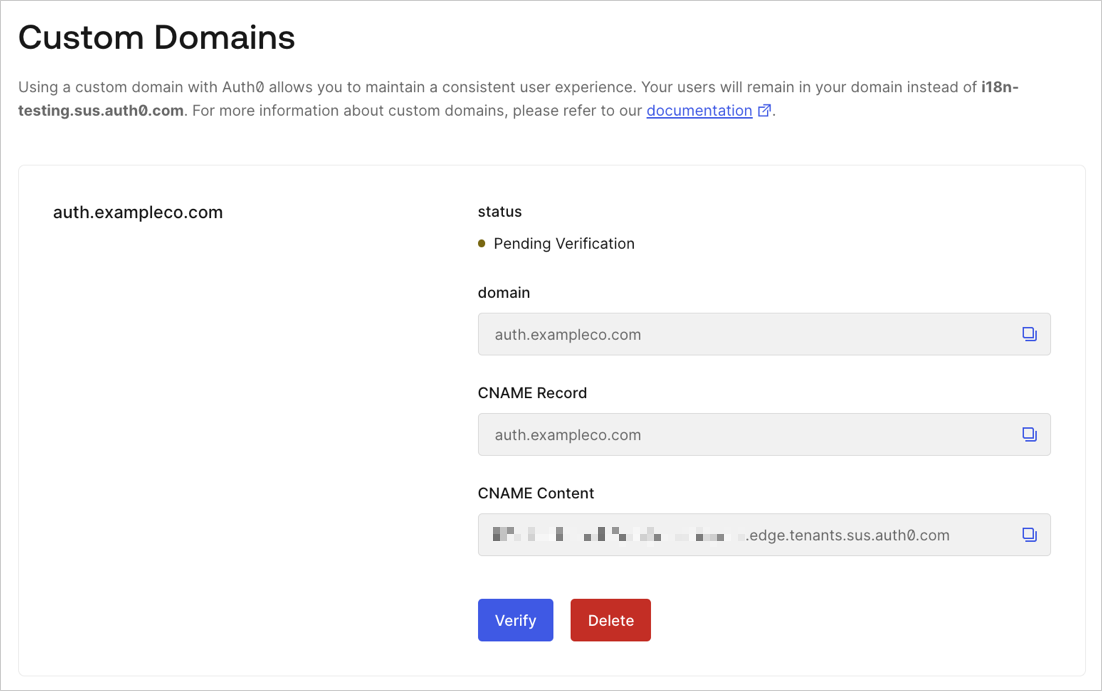
Click Verify to proceed.
It may take a few minutes before Auth0 is able to verify your CNAME record, depending on your DNS settings. If Auth0 was able to verify your domain name, you’ll see a confirmation window. This means the verification process is complete. Within 1 to 2 minutes, your custom domain should be ready to use.
Once added, the CNAME record must be present at all times to avoid issues during certificate renewal.
Auth0 recommends turning off CNAME flattening unless it’s strictly necessary because CNAME flattening for Auth0 managed certificates is an unsupported configuration and may cause the custom domain to break without notice.
If you need to enable CNAME flattening for all subdomains managed by Cloudfare and also configure a specific subdomain to be an Auth0 custom domain, consider delegating the subdomain for Auth0 to another DNS provider.
This will enable you to use CNAME flattening for all subdomains except the one used for Auth0.The following steps may vary for your domain host provider.
Log in to your domain management service.
Create a new record.
Parameter
Value
Record type
CNAME
Name
Enter your custom domain name (such as login.northwind.com).
Time to Live (TTL)
Use default value.
Value
Paste in the CNAME value provided by the Auth0 Dashboard for your domain’s DNS record.
When done, save your record.
If Auth0 was able to verify your domain name, you’ll see a confirmation window. This means the verification process is complete. Within 1 to 2 minutes, your custom domain should be ready to use.
If your DNS provider enables a proxy on the CNAME record by default, it will leave the custom domain in a pending state indefinitely. You may need to check your DNS provider settings and disable the proxy.
If you are unable to complete the verification process, wait at least 4 hours before repeating these steps. To avoid any interruptions to your service, do not recreate the custom domain when reverifying.
There are additional configuration steps you must complete depending on which Auth0 features you are using. To learn more, see Configure Features to Use Custom Domains.


 Authenticate
 Manage Users
 Customize
 Platform