Documentation Index
Fetch the complete documentation index at: https://docs-staging.auth0-mintlify.app/llms.txt
Use this file to discover all available pages before exploring further.
Event Stream Actions are currently available in Early Access.To learn more about Auth0’s product release cycle, review Product Release Stages.
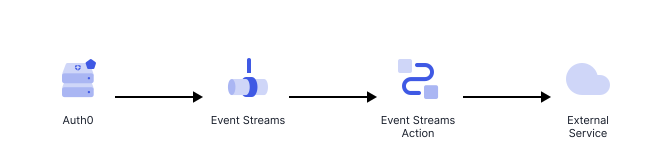
Event Stream Actions are logic-based functions that execute asynchronously when specific events occur within your Auth0 tenant. These are non-blocking actions and won’t impact the latency of your user’s experience.
Each Event Stream Action is associated with an Event Stream, and listens for a pre-defined set of Event Types (for example, successful logins, password changes, or user deletions). When a subscribed event occurs, the Action is triggered. Unlike Login or Pre-Registration Actions, Event Stream Actions run in the background and do not affect the primary transaction of the user.
These Actions are non-blocking (asynchronous), suscribed to a specific set of Event Types.
Triggers
Event Stream
The event-stream Actions are functions executed when subscribed Event Types happen.
References
- Event object: Provides context for both Event Stream message and Action execution.
- API object: Provides methods to modify the flow behavior.
Use cases
Synchronization
A event-stream Action can be used to communicate a particular event to an external service based on custom logic. The following Action demonstrates how to securely forward an event message to an external service using a stored API key.
/**
* Handler to be executed while processing events in an Event Stream.
* @param {Event} event - Details about the incoming event.
* @param {EventStreamAPI} api - Methods and utilities to define event stream processing.
*/
exports.onExecuteEventStream = async (event, api) => {
const message = event.message;
try {
await fetch(event.secrets.URL, {
method: 'POST',
headers: {
'X-API-Key': event.secrets.API_KEY,
},
body: JSON.stringify(message),
});
} catch (err) {
throw new Error('External service failure');
}
return;
};
To learn more about writing Actions, read Write Your First Action.
To learn more about creating an Event Stream, read Create an Event Stream.