

- Go to Dashboard > Applications > Applications and either create a new application or click the name of an application to update.
- Go to the Addons tab and enable the SAML2 Web App toggle.
-
On the Settings tab, set the Application Callback URL to:
https://{yourDomain}.litmos.com/integration/samllogin.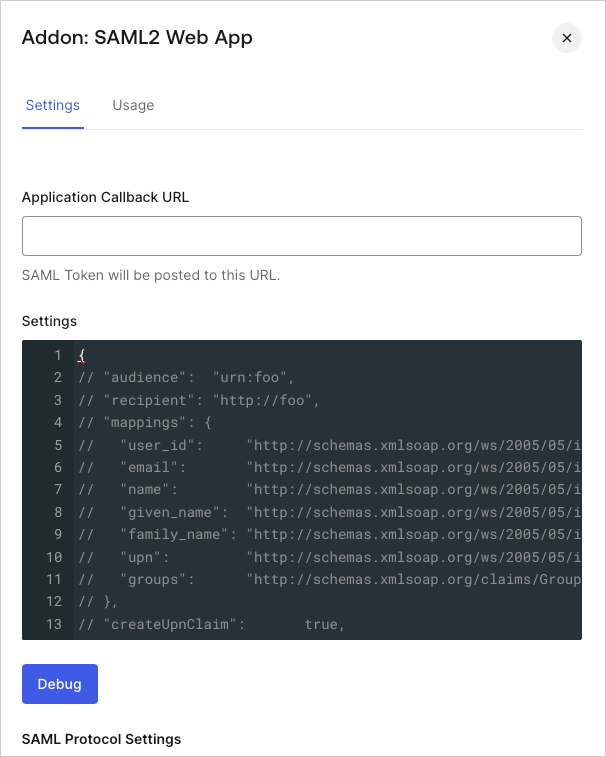
- Paste the following code into the Settings text box and click Debug.
- Scroll to the bottom of the page and click Enable.
-
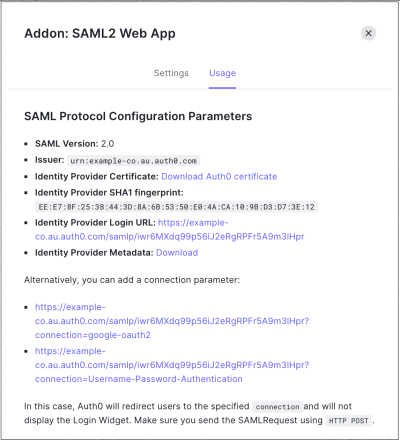
On the Usage tab, locate Identity Provider Metadata, and click Download to download the metadata file. You’ll need this when you configure Auth0 as the identity provider.
Configure Litmos as SAML Service Provider
Learn how to configure Auth0 as an identity provider using the SAML2 Web App addon for Litmos.
Use the following configuration for Litmos.