> ## Documentation Index
> Fetch the complete documentation index at: https://docs-staging.auth0-mintlify.app/llms.txt
> Use this file to discover all available pages before exploring further.
# Search Organization Members
> Use User Search to find Auth0 Organization members with queries that scope results by Organization membership, email address, or connection type.
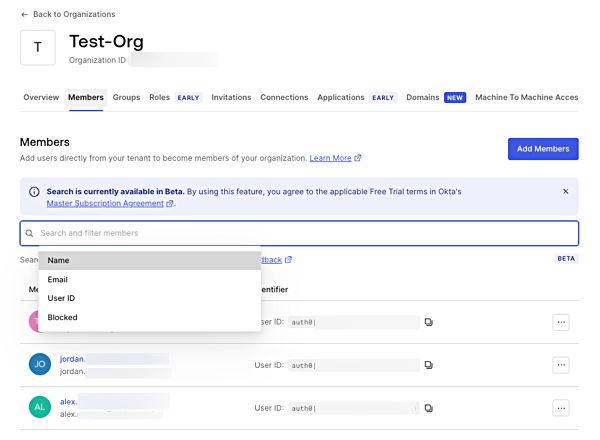
You can search and filter Organization members with the [Auth0 Dashboard Search](/docs/get-started/auth0-overview/dashboard/search-and-filter-auth0-dashboard#organization-members) feature or with [User Search](/docs/manage-users/user-search).
Dashboard search [filters Organization members](https://manage.auth0.com/#/organizations) by name, email, user ID, or blocked status under the Organizations section.
 [User search](https://manage.auth0.com/#/users) allows you to find users filtered by Organization membership using the `organization_id` parameter under the Users section.
The following filter finds users that have an `acme.com` email domain but are not members of the Acme Organization:
`email.domain:"acme.com" AND NOT organization_id:"ACME_ORG_ID"`
The following finds all users that are in the Acme Organization and log in with a specific database connection.
`organization_id:"ACME_ORG_ID" AND identities.connection:"my-db-connection-name"`
The following example finds users whose email addresses start with jane and are members of the Acme Organization.
`organization_id:"ACME_ORG_ID" AND email:jane*`
To learn more, read [User Search](/docs/manage-users/user-search).
[User search](https://manage.auth0.com/#/users) allows you to find users filtered by Organization membership using the `organization_id` parameter under the Users section.
The following filter finds users that have an `acme.com` email domain but are not members of the Acme Organization:
`email.domain:"acme.com" AND NOT organization_id:"ACME_ORG_ID"`
The following finds all users that are in the Acme Organization and log in with a specific database connection.
`organization_id:"ACME_ORG_ID" AND identities.connection:"my-db-connection-name"`
The following example finds users whose email addresses start with jane and are members of the Acme Organization.
`organization_id:"ACME_ORG_ID" AND email:jane*`
To learn more, read [User Search](/docs/manage-users/user-search).