

This feature is only available for Enterprise plan customers. To learn more, read Pricing.
If you want a support agent or other authorized actor to establish a session as another user rather than move a user’s own session from native to web, read Session Delegation instead.
How it works
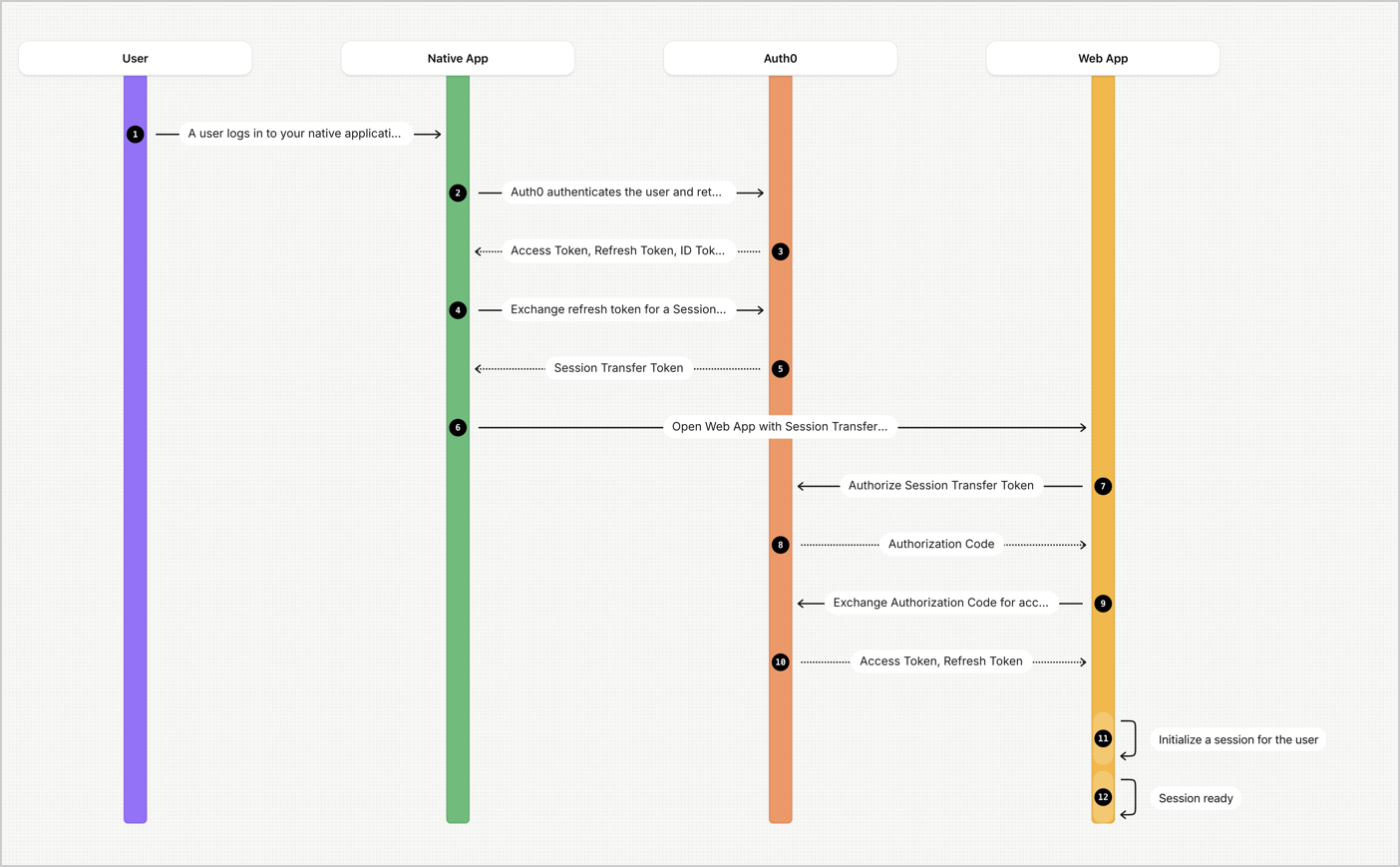
- A user logs in to your native application.
- Auth0 authenticates the user and returns an access token, refresh token, and ID token.
- Your native application calls Auth0’s
/tokenendpoint to exchange a refresh token for a Session Transfer Token. The Session Transfer Token is bound to a specific IP address or ASN. - Auth0 returns the Session Transfer Token for authentication with a web application.
- Auth0 authorizes the Session Transfer Token as part of the cookie or as a URL parameter, and then returns an authorization code.
- The web application exchanges the authorization code for access or refresh tokens at the
/tokenendpoint. - The web application initializes a session for the user.
Limitations
- Once Native to Web SSO is enabled in an application, the
session_transfer_tokenparameter only works for Native to Web SSO. - originated from a previous Session Transfer Token transaction do not generate new Session Transfer Tokens.