> ## Documentation Index
> Fetch the complete documentation index at: https://docs-staging.auth0-mintlify.app/llms.txt
> Use this file to discover all available pages before exploring further.
> Explore what you need to be aware of when using Auth0 Developer Keys with social identity providers.
# Test Social Connections with Auth0 Developer Keys
Key Concepts
* Review the limitations of Auth0's developer keys.
When using any of the available [social identity providers](/docs/authenticate/identity-providers/social-identity-providers), you need to register your application with the relevant identity provider in order to obtain a Client ID and Client Secret.
Auth0 allows you to test a Social Identity Provider without specifying your own Client ID and Client Secret by using Auth0 developer keys. This allows you to quickly enable and test a specific Social Identity Provider, but it should not be used in production.
Auth0 developer keys are not available in [Private Cloud deployments](/docs/deploy-monitor).
For production environments, make sure to [follow the steps for your chosen provider](/docs/authenticate/identity-providers) to obtain the Client ID and Client Secret from the provider to avoid the [limitations](#limitations-of-developer-keys) of using developer keys. For instructions on converting Google developer keys to production keys, [read this Auth0 Developer Lab.](https://developer.auth0.com/resources/labs/authentication/google-social-connection-to-login#set-up-google-production-keys)
One or more connections are using Auth0 development keys which are only intended for use in development and testing. The connections should be configured with your own Developer Keys to enable the consent page to show your logo instead of Auth0's and to configure Single Sign-on (SSO) for these connections. Auth0 development keys are not recommended for Production environments.
The exact terminology of a Client ID / Client Secret may differ between various Identity Providers. For example, X refers to these as a Consumer Key / Consumer Secret and LinkedIn refers to an API Key / Secret Key.
## Limitations of developer keys
Auth0 developer keys are meant strictly for testing. Using them instead of your own Client ID and Client Secret can cause unexpected behavior, restricted functionality, or app errors.
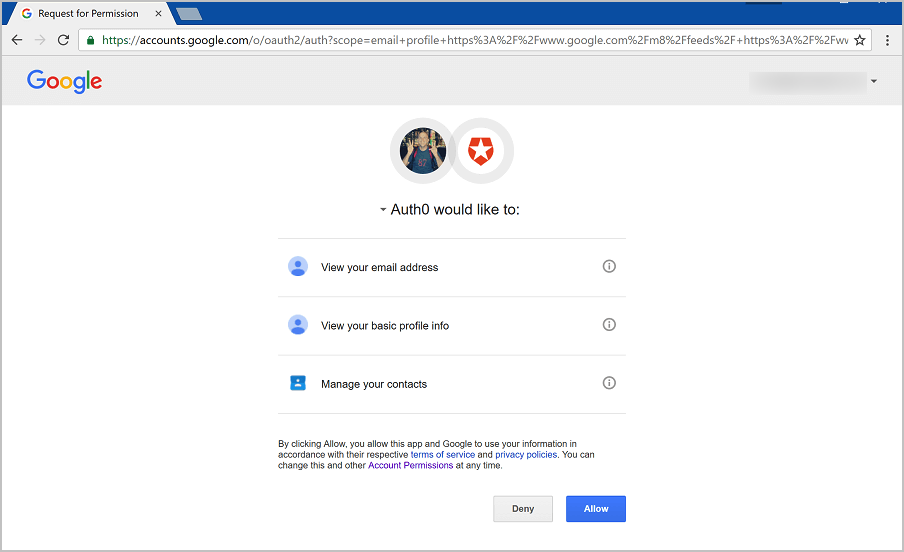
When using the Auth0 developer keys, the authentication flow for the various identity providers may display Auth0's name, logo, and information to your users. When you register your own application, you have the opportunity to use your own logo and other application information instead.
 ## Limitations of developer keys when using Universal Login
If you are using the [Classic Login experience](/docs/authenticate/login/auth0-universal-login/universal-login-vs-classic-login/classic-experience) or the [Universal Login Experience](/docs/authenticate/login/auth0-universal-login/universal-login-vs-classic-login/universal-experience), the following limitations apply:
1. You cannot use developer keys with [custom domains](/docs/customize/custom-domains).
2. [Single Sign-On](/docs/authenticate/single-sign-on) will not function properly when using the Auth0 developer keys. The Auth0 developer applications are configured to call back to the URL `https://login.auth0.com/login/callback` instead of the **callback URL** for your own tenant, for example `https://YOUR_AUTH0_DOMAIN/login/callback`.
This results in the SSO cookie not being set on your own tenant domain, so the next time a user authenticates, no SSO cookie will be detected, even if you configured your application to **Use Auth0 instead of the Identity Provider to do Single Sign-on** (legacy tenants only).
3. [Redirecting users with Actions](/docs/customize/actions/explore-triggers/signup-and-login-triggers/login-trigger/redirect-with-actions) will not function properly. Redirect Actions resume on the endpoint `https://YOUR_AUTH0_DOMAIN/continue`. When using Auth0's developer keys, the session is established on a special endpoint that is generic and tenant agnostic, and calling `/continue` will not find your previous session, resulting in an error.
4. [Federated Logout](/docs/authenticate/login/logout) does not work. When using the Auth0 developer keys, calling `/v2/logout?federated` will sign the user out of Auth0, but not out of the Social Identity Provider.
5. `prompt=none` won't work on the [/authorize](https://auth0.com/docs/api/authentication/reference#social) endpoint. [Auth0.js](/docs/libraries/auth0js)' checkSession() method uses `prompt=none` internally, so that won't work either.
6. If Auth0 is acting as a SAML Identity Provider, and you use a social connection with the Auth0 developer keys, the generated SAML response will have some errors, like a missing `InResponseTo` attribute or an empty `AudienceRestriction` element.
7. [Multi-Factor Authentication](/docs/secure/multi-factor-authentication) will not function properly. When MFA authentication is successful, a POST request is sent to `https://YOUR_AUTH0_DOMAIN/mf`. When using Auth0's developer keys, the session is established on a special endpoint that is generic and tenant agnostic, and calling `/mf` will not find your previous session, resulting in an error.
## Limitations of developer keys when using Universal Login
If you are using the [Classic Login experience](/docs/authenticate/login/auth0-universal-login/universal-login-vs-classic-login/classic-experience) or the [Universal Login Experience](/docs/authenticate/login/auth0-universal-login/universal-login-vs-classic-login/universal-experience), the following limitations apply:
1. You cannot use developer keys with [custom domains](/docs/customize/custom-domains).
2. [Single Sign-On](/docs/authenticate/single-sign-on) will not function properly when using the Auth0 developer keys. The Auth0 developer applications are configured to call back to the URL `https://login.auth0.com/login/callback` instead of the **callback URL** for your own tenant, for example `https://YOUR_AUTH0_DOMAIN/login/callback`.
This results in the SSO cookie not being set on your own tenant domain, so the next time a user authenticates, no SSO cookie will be detected, even if you configured your application to **Use Auth0 instead of the Identity Provider to do Single Sign-on** (legacy tenants only).
3. [Redirecting users with Actions](/docs/customize/actions/explore-triggers/signup-and-login-triggers/login-trigger/redirect-with-actions) will not function properly. Redirect Actions resume on the endpoint `https://YOUR_AUTH0_DOMAIN/continue`. When using Auth0's developer keys, the session is established on a special endpoint that is generic and tenant agnostic, and calling `/continue` will not find your previous session, resulting in an error.
4. [Federated Logout](/docs/authenticate/login/logout) does not work. When using the Auth0 developer keys, calling `/v2/logout?federated` will sign the user out of Auth0, but not out of the Social Identity Provider.
5. `prompt=none` won't work on the [/authorize](https://auth0.com/docs/api/authentication/reference#social) endpoint. [Auth0.js](/docs/libraries/auth0js)' checkSession() method uses `prompt=none` internally, so that won't work either.
6. If Auth0 is acting as a SAML Identity Provider, and you use a social connection with the Auth0 developer keys, the generated SAML response will have some errors, like a missing `InResponseTo` attribute or an empty `AudienceRestriction` element.
7. [Multi-Factor Authentication](/docs/secure/multi-factor-authentication) will not function properly. When MFA authentication is successful, a POST request is sent to `https://YOUR_AUTH0_DOMAIN/mf`. When using Auth0's developer keys, the session is established on a special endpoint that is generic and tenant agnostic, and calling `/mf` will not find your previous session, resulting in an error.